

Since 1978, Corvette enthusiasts have relied on Mike Antonick’s Corvette Black Book for official data on all Corvette models including engine info, RPO take rates, colors and production numbers. I always have a copy of the Black Book on my desk for helping me answer questions that come up often, especially when writing about exterior colors or looking up the engine options on the classics. Unfortunately, the Corvette Black Book hasn’t been updated since the 2023 model year, and we recently heard the bad news that Mike was ending production of the book due to the rising costs of the special sized paper and higher printing costs.
Thankfully, there is now a new option that not only continues the tradition of the Corvette Black Book but extends it into modern times by offering all that important data in an app for your mobile phone.
This new app is called the Vette Pocket Guide and it packages all the data from the Corvette Black Book that you’ve come to rely on like production numbers and options, but there is also a bunch of improvements for presenting that data. For example, each of the model year color charts are now in full color pie charts which offers a visual representation of both the colors offered and how many in each color were produced.
The Vette Pocket Guide is extremely easy to use and it becomes very intuitive once you understand how to navigate to the individual screens. Generally, from the Home Screen, you can select your generation, and then select the individual model year you want to look at. To show examples, I grabbed a few of the screens from the 1966 model year and have them listed below.
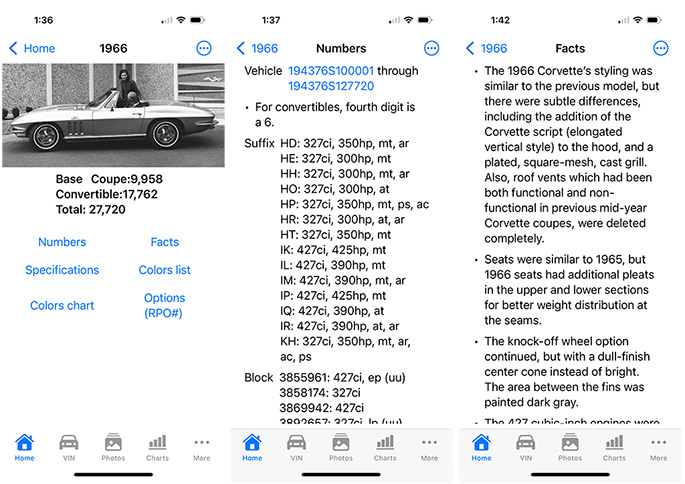
As you can see, it’s the same great data that’s presented in the book and now you can benefit from being able to access it all in the palm of your hand through the mobile app.
One of the challenges facing Antonick’s Black Book in recent years was that the modern Corvettes have a lot more information available to buyers than the models from previous generations. Previously, that data was able to fit on two pages within the Corvette Black Book, but with the more modern Corvettes, Mike was forced to have users jump to the end of the book for additional details. The App solves that issue so that all the data for the model is located under the model year. There are new features like Dealer Installed Options (LPO data), and we see some of the models even have a cold start sound that you can play.
Another really cool feature on the Vette Pocket Guide is the VIN Decoder. Just add any Corvette VIN to the decoder and it will pull up all relevant info about it. I put in my VIN for my 2025 Corvette E-Ray, and it provides a summary of the car, or you can select the tab to see the decoder which breaks out the individual VIN digits/characters in each position. For select years, the app will even pull up a copy of the window sticker. I can see that being great info for those at auctions or those who may be buying a car and are trying to research the model year.
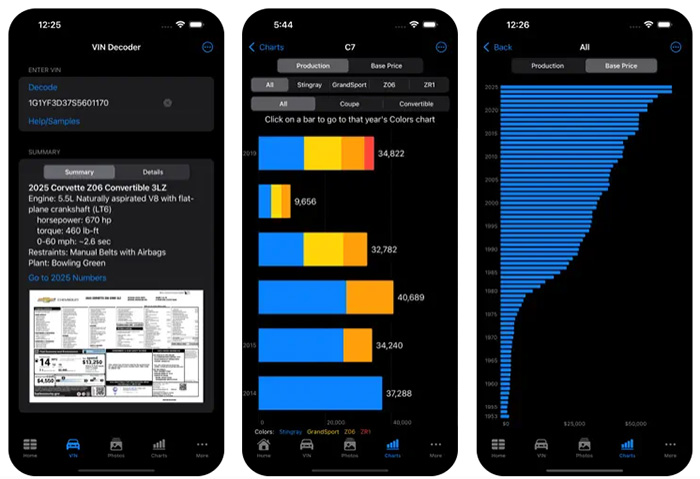
There is also a menu item for Charts which shows the individual models ranked by production numbers and the base price, and another screen shows 3d models of select Corvettes and allows you to spin them around.
The Vette Pocket Guide is currently available for iPhone and iPad, and a version for the Android phone are expected soon. The price of the Vette Pocket Guide is just $25 to download, and then yearly updates are provided for just $5.00. When’s the last time you’ve seen a subscription to anything Corvette related that costs just $5 per year. That’s unheard of!
To get your Vette Pocket Guide, click here to visit the App Store.
Our friend Mike Brink from Brink of Speed recently featured the app on Octane Hour and the video takes us through takes us through the many features and information available for each model year:
Source:
Vette Pocket Guide
Subscribe Now:

![[PODCAST] Corvette Today #240: Holiday Vendor Showcase](https://www.corvetteblogger.com/images/content/uploads/2024/11/111824_5-218x150.jpg "This Dealer Installed Emblem Might Become One of the Rarest Options for 2027")


I’d buy it in a heartbeat with the update option, but I need a Windows 10 version.
(Yup, I know that security updates for Win 10 will no longer be available from Micro$oft come October but I’ll stick with 0Patch for my updates. BTW, The first character in 0Patch is a zero, not a letter O.)
Montana Bob
Comments are closed.